Spectrum and waterfall
The band drawn live, with the waterfall scrolling underneath it. Click a signal to tune it, drag the passband to fit it, and watch a carrier come and go over minutes rather than guessing at a meter.
Every build before 0.55.0 looked for its hardware drivers in a folder that could not exist, so no receiver of any kind was found: not RTL-SDR, not Airspy, not HackRF, not USRP. If you installed it, saw an empty Source list and concluded the software did not work — you were right, and we are sorry you lost time to it. Download the current version and your radio will appear. RTL-SDR dongles need Zadig as well; the app now says so.
Please sign up as a tester and tell us when something breaks. This one reached everybody because nobody could tell us — a single report would have caught it in a day. FoxSDR is in open beta — that is exactly what the beta is for.
 FoxSDR
Download
FoxSDR
Download
Open beta Version 0.59.0 · Windows x64 · free for noncommercial use
FoxSDR is in open beta. It is free, it is complete enough to use every day, and it still has rough edges — which is why finding them is the most useful thing you can do with it.
FoxSDR is a software-defined radio receiver written from scratch: a live spectrum and waterfall, every mode you actually use, stereo FM with RDS, a map that plots the aircraft and ships it decodes — and the whole interface served to a browser, so the receiver can live where the antenna is.
Everything below is in the current build. Where a claim is weaker than it looks, the page says so rather than leaving you to find out.
The band drawn live, with the waterfall scrolling underneath it. Click a signal to tune it, drag the passband to fit it, and watch a carrier come and go over minutes rather than guessing at a meter.
NFM, WFM, AM, DSB, USB, LSB and CW, with squelch, AGC, noise reduction, manual and automatic notch, and de-emphasis. Broadcast FM decodes in stereo with pilot lock, and RDS gives you the station name, radio text, PI and programme type.
Any device SoapySDR can reach, with antenna, sample rate and per-stage gain selection. Developed against an Ettus B200. No hardware at all? The built-in signal generator and I/Q file playback mean the whole application still runs.
Bookmarks for the frequencies you keep coming back to, a band scanner that stops on activity, band plans that label what you are looking at, and recording of both demodulated audio and raw I/Q.
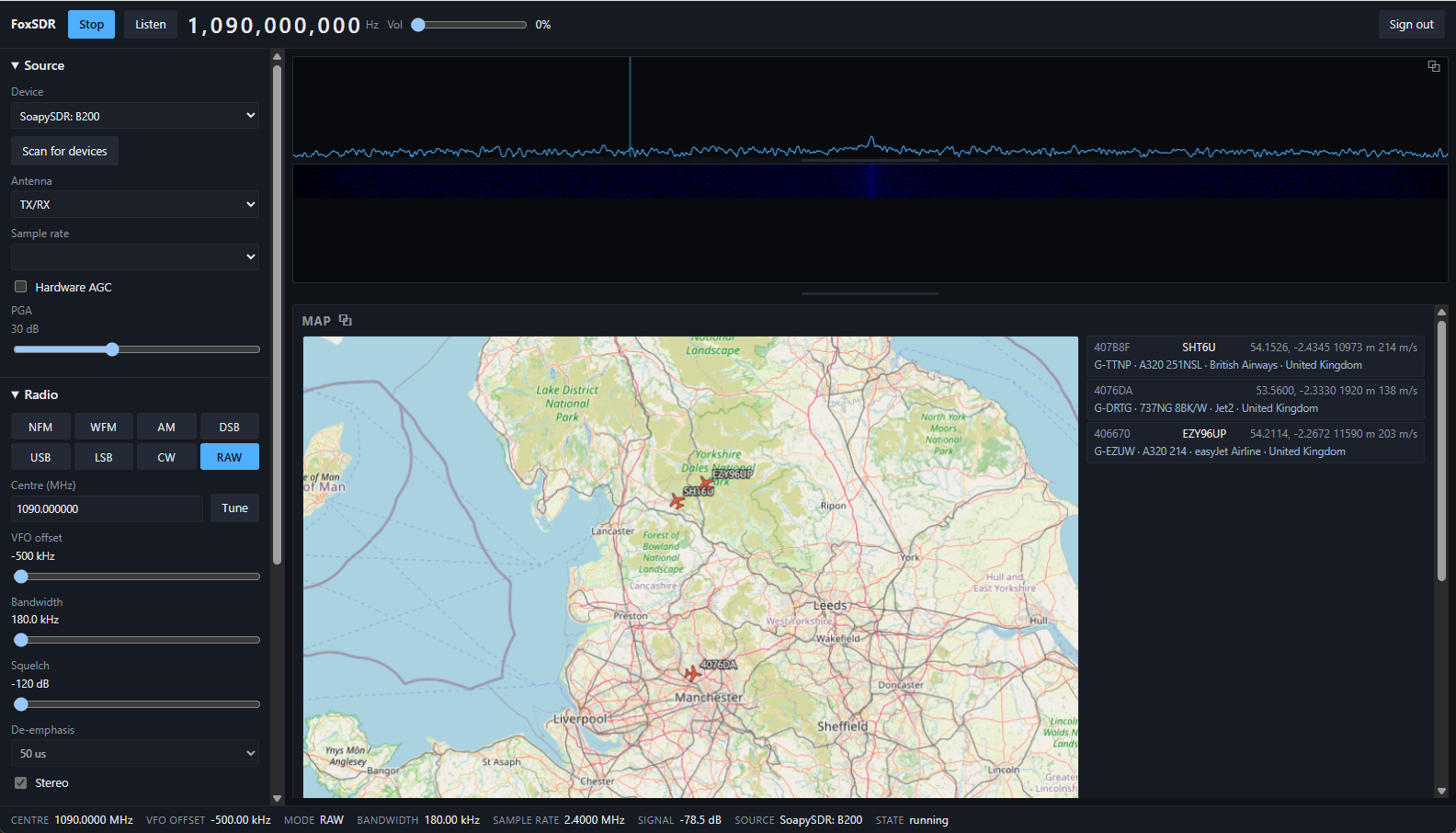
Aircraft, vessels and stations plotted together as they are received. Decoder plugins can put their own targets and tracks on it, and a basemap plugin adds street-level tiles from a tile server you run yourself.
Slow-scan television and weather-satellite images build line by line in their own window and save as files. SSTV identifies the mode from the transmission's own header and corrects the clock drift that leaves other decoders with a slanted picture.
Decoders install from a catalogue inside the app, which is contacted only when you press Browse. Every download is HTTPS, size-capped, refused on a cross-host redirect, and verified against the sha256 in the catalogue before it is allowed to become a file.
A plugin that can retune the receiver can also take it away from you, so retuning is a permission you grant per plugin. It is off by default, off for every newly installed plugin, and a plugin that asked and was refused says so on its panel instead of silently doing nothing.
FoxSDR speaks the protocol Hamlib's rigctld uses, so logging and digital-mode
software can read and set the frequency and mode over the network — point the client at this
machine and pick a "NET rigctl" radio. Tuning inside the band already on screen moves only the
VFO, so there is no retune and no gap in the waterfall. It always reports receive and refuses
to transmit, because it is a receiver and pretending otherwise would leave a client waiting
on a signal that never goes out.
No GPL code and no GPL-linked dependency anywhere in the tree. ImGui, GLFW, PortAudio, nlohmann/json and pffft are vendored at pinned revisions and built from source; FFTW and librtlsdr are deliberately not used. That discipline is what makes the licence a choice.
FoxSDR serves its whole interface over HTTP on your own network, at feature parity with the desktop — same spectrum, same controls, live audio, the map beside the track list. The machine with the radio on it can sit in the loft with the coax, and you drive it from the sofa.
Eleven plugins are published today. Each entry says exactly how well it is verified, because "decodes AIS" and "decodes AIS off the air" are different claims.
Aircraft position, callsign and velocity at 1090 MHz. Decoded live off the air, with ICAO address blocks and callsigns agreeing across independent message types.
Turns a 24-bit aircraft address into who it actually is: registration, type, operator and country, shown on the map and in the track list.
Ship positions and voyage data on the marine band. Both channels at once from one receiver, plotted with everything else on the map.
Bell 202 packet radio from 144.800 MHz NFM audio: positions, messages, status and telemetry, validated against the AX.25 frame check.
Slow-scan pictures on HF and 2 m. The mode is read from the transmission's own VIS header, and clock drift is measured from the sync pulses, corrected, and reported in ppm.
Finds the tone, works the speed out from the signal itself, follows an operator who changes pace, and reports the words per minute it settled on.
45.45 baud amateur radioteletype on HF. Polarity is worked out from the signal rather than asked for, and both character sets are handled.
All three bit rates and inverted polarity detected automatically. The BCH error-correcting code is implemented in full: damaged codewords are discarded rather than shown as text.
Street-level tiles under the map, fetched from a tile server you run yourself — which is what keeps the imagery licensing with whoever serves it.
Maritime safety broadcasts. Roughly ten of its air-interface constants are reconstructed guesses, so it will most likely decode nothing off air — and it is published at 0.1.0 saying exactly that.
The reference plugin: reports the RMS level of the demodulated audio, and exists to show what writing one looks like.
Plugins are ABI-exact: one built for a different host version is refused rather than loaded,
because a struct-layout difference becomes memory corruption days later. plugin_abi.h
is MIT-licensed on purpose, so anyone — including commercial vendors — can write one without
asking us for a licence.
ADS-B. Aircraft decoded live off the air, cross-checked across message types. The audio chain has been confirmed by ear on broadcast FM.
AIS, APRS, SSTV, Morse, RTTY and POCSAG — tested against generated waveforms and published constants. That is real evidence, and it is not the same thing as off-air confirmation.
Inmarsat-C, published at 0.1.0 and marked experimental in the catalogue itself.
The DSP core and every decoder carry unit tests — 54 suites in the current source, passing on both Windows and Linux. FoxSDR is working and in daily use, and still pre-1.0 — the interface and the catalogue are moving.
A Linux build exists and passes the same 54 suites, and ten of the eleven catalogue plugins now ship Linux builds beside the Windows ones, so the decoders install and run there too. Windows is still the only supported platform, for one blunt reason: no radio has ever been driven through the Linux build. It has only run under WSL and a virtual display in CI, never on a real desktop with a real sound card. Build it and experiment; do not rely on it.
An Inno Setup installer that puts down the application, the SoapySDR runtime and the app-local Microsoft C runtime. It writes nothing outside its install directory and your own user profile, and uninstalls cleanly from Add/Remove Programs.
Download foxsdr-setup-0.59.0.exe 3.1 MB · Windows x64
SHA-256
73de8e2472d52776124265b1d53938086515411ecf7984636a2ad7f103dc80b7
The same product built from the latest source rather than from a release. It gets fixes days or weeks earlier and it is not the build to install if you just want a working receiver: it has had no soak testing, and something that works today may not tomorrow. Take it if you are helping find problems — and when you report one, the version below is what identifies your build.
No nightly is currently published — the latest fixes are all in the stable build above. A new nightly appears here when master moves ahead of it.
POSTINSTALL.txt in the install folder. FoxSDR finds either
in its default location by itself. It runs without either, using the signal generator or
I/Q playback.The application is licensed under the PolyForm Noncommercial License 1.0.0. Hobbyists, amateur radio operators, students, charities, schools and public bodies may use, modify and share it at no cost — permanently and unconditionally. No trial period, no registration, no licence key, no activation, and no feature held back to sell you later.
Using it in a business, selling it, bundling it with hardware or building a product from it needs a commercial licence. That is what funds the free half.
FoxSDR is an independent project, not affiliated with or endorsed by SDR++ or its authors. Bundled third-party components keep their own permissive licences.
The section above is honest about what has never been confirmed against a real signal. This is how that gets fixed. Tell us what you are willing to test and what you will test it with, and you will hear when a build lands that needs it — with somewhere to send what breaks.
This is how you get back to change what you are testing, from any device. Keep it — there is no password to reset and no email sent, so if you lose it you will have to write to us. Anyone who has the link can edit your entry, so if it ever gets out, press New link: the old one stops working immediately.
One report per feature per radio. "It works on mine" is worth as much as a bug — it is how a feature ever gets to be called confirmed, and it is what fills in the coverage table.
Nothing yet.